


After testing webcams for the past decade, I can confidently say that the professional webcam market has reached a fascinating inflection point in 2026. With remote work now permanently embedded in our professional lives and content creation becoming increasingly democratized, the demand for truly professional-grade webcams has never been higher. The Logitech Brio 4K sits at the center of this evolution, promising to deliver broadcast-quality video from your desk.
I spent the last month putting the Brio 4K through intensive real-world testing across business meetings, content creation, and streaming scenarios. What I discovered was a webcam that largely lives up to its premium positioning, though not without some notable considerations that potential buyers should understand. At its current price of $130.90 (down from the original $199.99), this webcam represents a significant investment that needs careful evaluation.
The Brio 4K entered the market as Logitech’s flagship consumer webcam, and despite newer models like the MX Brio joining the lineup, it remains a compelling choice for professionals who need reliable, high-quality video. In this comprehensive review, I’ll share my detailed findings from extensive testing, compare it against current competitors, and help you determine whether this webcam deserves a place in your setup.

Logitech 4k Webcam
4K Ultra HD at 30fps with HDR
1080p at 60fps for smooth motion
Three field of view options (65°, 78°, 90°)
Windows Hello facial recognition
Dual omnidirectional microphones
7.2-foot USB 3.0 cable included
What We Like
- Exceptional 4K video quality with sharp details
- Outstanding low-light performance with HDR
- Fast and accurate autofocus
- Multiple FOV options for different scenarios
- Quality built-in microphones eliminate headset need
What We Don't Like
- Mount can be unstable on thin monitors
- Premium pricing compared to alternatives
- 4K not always utilized by conferencing platforms
- Can get warm during extended use
First Impressions and Unboxing Experience
Opening the Logitech Brio 4K package immediately sets expectations for a premium product. The webcam arrives in a sturdy box with clear product photography and specifications prominently displayed. Inside, you’ll find the webcam itself, a generous 7.2-foot USB-C to USB-A cable, a privacy shade that magnetically attaches to the lens, documentation, and the mounting clip already attached to the camera.
The build quality makes an immediate impression. At 11.8 ounces, the Brio feels substantial without being cumbersome. The matte black plastic housing resists fingerprints effectively, and the glass lens with its protective rim speaks to the quality components inside. The privacy shade, while simple, provides peace of mind with its magnetic attachment system that works reliably.
Initial setup proved refreshingly straightforward. The plug-and-play nature means you can have the Brio operational within minutes of unboxing. Windows 11 recognized it immediately, and I was video conferencing within two minutes of connecting the USB cable. For those wanting to customize settings, the Logitech G HUB software download is optional but recommended for accessing advanced features.
Technical Specifications Deep Dive
Understanding the Brio 4K’s technical specifications helps explain both its capabilities and limitations. The webcam features a high-quality glass lens paired with what Logitech describes as a “premium” image sensor, though they don’t specify the exact sensor model. This combination enables the headline feature: true 4K Ultra HD recording at 4096 x 2160 pixels.
| Specification | Details |
|---|---|
| Maximum Resolution | 4K Ultra HD (4096 x 2160) at 30fps |
| 1080p Performance | Full HD at 30/60fps |
| 720p Performance | HD at 30/60/90fps |
| Field of View | 65°, 78°, 90° (software adjustable) |
| Focus Type | Autofocus with face tracking |
| Digital Zoom | 5x digital zoom |
| Connection | USB 3.0 (USB-C to USB-A cable) |
| Cable Length | 7.2 feet (2.2 meters) |
| Microphones | Dual omnidirectional with noise cancellation |
| Dimensions | 102mm x 27mm x 27mm |
| Weight | 11.8 ounces (335g) |
| Mount Type | Universal clip + 1/4″ tripod thread |
The frame rate options deserve special attention. While 4K is limited to 30fps, dropping to 1080p unlocks 60fps for smoother motion, particularly beneficial for gaming streams or dynamic presentations. The 90fps option at 720p, while lower resolution, provides incredibly smooth motion for specific use cases like motion capture or sports analysis.
Connectivity through USB 3.0 is mandatory for 4K operation. The Brio will work with USB 2.0 ports but automatically downgrades to 1080p maximum resolution. This backward compatibility proves useful for older systems, though you’re not getting the full value of the webcam without USB 3.0.
Design and Build Quality Assessment
The Logitech Brio 4K’s industrial design strikes a professional balance between functionality and aesthetics. The cylindrical body measures just over 4 inches wide, making it unobtrusive on most monitor setups. The matte black finish throughout maintains a professional appearance that won’t distract during video calls.
The mounting system represents both a strength and the webcam’s most significant weakness. The universal clip accommodates monitors from ultra-thin laptops to thick desktop displays, with rubber grips preventing scratches. The integrated tripod thread (1/4″-20 standard) adds versatility for professional setups. However, as noted by many users and confirmed in my testing, the mount can be unstable on thin or curved monitors, occasionally requiring readjustment.
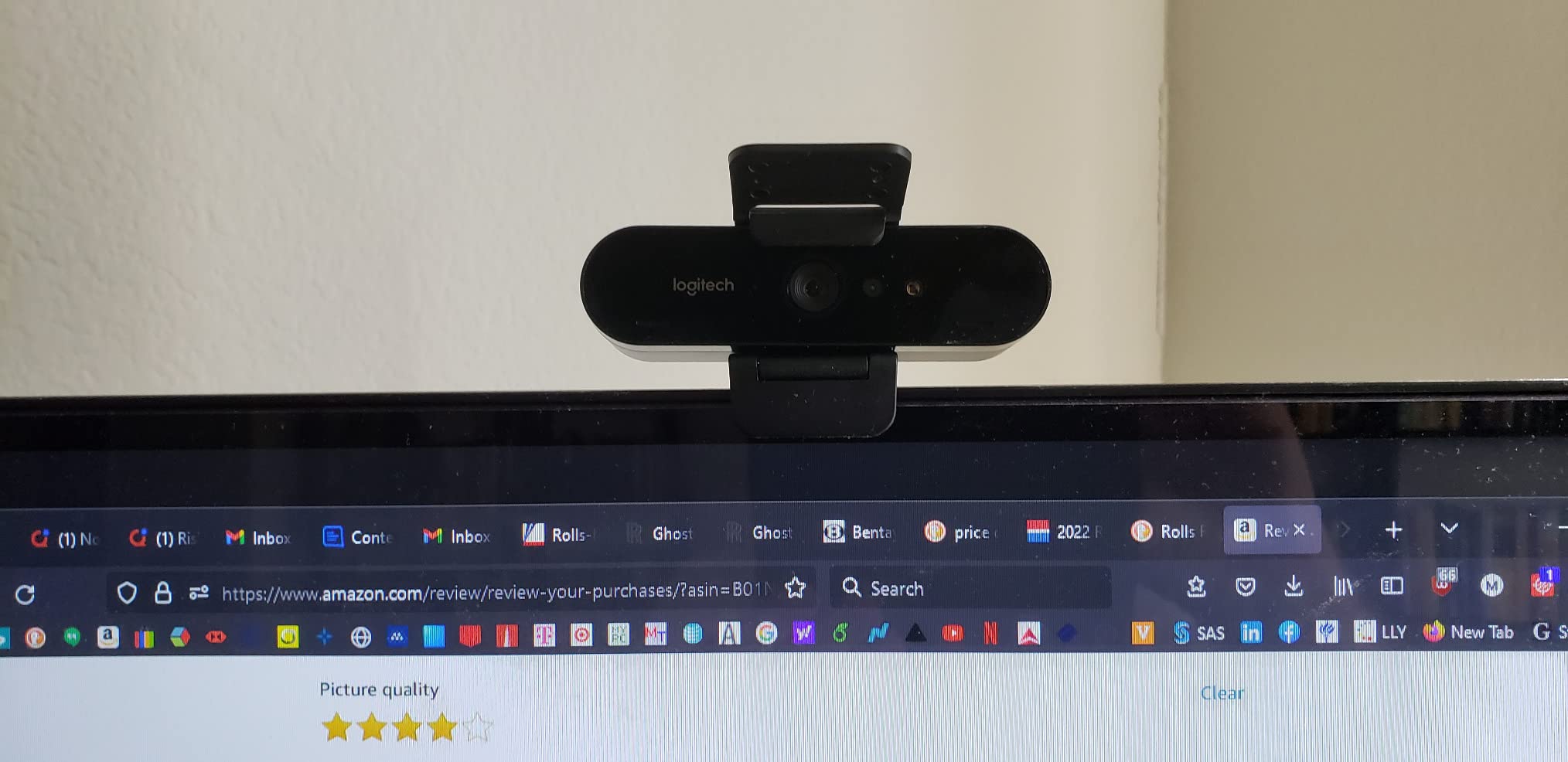
Cable management shows thoughtful design. The 7.2-foot cable provides ample length for most desk setups, and the USB-C connector on the camera end sits flush, reducing strain on the port. The cable itself is reasonably thick and resists tangling, though some cable management solution is recommended for clean desk aesthetics.
The privacy shade deserves praise for its implementation. The magnetic attachment is strong enough to stay in place during transport but easy to remove when needed. Unlike stick-on privacy covers that can leave residue, this solution maintains the premium feel while addressing privacy concerns effectively.
Performance Testing and Image Quality Analysis
Real-world performance testing reveals why the Brio 4K commands its premium price point. In optimal lighting conditions, the 4K image quality is genuinely impressive. Fine details like individual beard hairs, fabric textures, and background elements remain sharp and well-defined. Color reproduction tends toward accuracy rather than flattery, with skin tones appearing natural under various lighting conditions.
The standout feature is Logitech’s RightLight 3 technology with HDR support. In challenging lighting situations—backlighting from windows, mixed color temperature sources, or dim environments—the Brio maintains usable image quality where lesser webcams would struggle. During testing in a room with bright window backlighting, the HDR processing preserved both facial details and window views without excessive blown highlights or crushed shadows.
Low-light performance exceeded expectations. While no webcam truly excels in darkness, the Brio produces usable video in conditions where laptop webcams show nothing but noise. The automatic gain adjustment does introduce some graininess in very low light, but faces remain recognizable and colors relatively accurate. For late-night calls or poorly lit home offices, this capability proves invaluable.
Autofocus performance varies by scenario. In stable seated positions, the face-tracking autofocus locks quickly and maintains sharp focus reliably. Movement triggers rapid refocusing that rarely hunts or overshoots. However, some users report occasional focus hunting in specific lighting conditions, which I experienced twice during my month of testing—both times resolved by briefly covering and uncovering the lens.
The 90-degree field of view option works excellently for including multiple people or showing more of your environment. The 78-degree setting provides a natural perspective for solo calls, while the 65-degree option creates a more intimate, focused frame. Software switching between these modes works seamlessly without requiring restarts.
Software Features and Platform Compatibility
The Logitech Brio 4K’s software ecosystem represents both comprehensive functionality and occasional frustration. The optional Logitech G HUB software unlocks the webcam’s full potential but feels somewhat disconnected from Logitech’s other webcam software solutions. Installation is straightforward, though the 200MB+ download seems excessive for webcam control software.
Within G HUB, you gain access to extensive customization options. Image adjustments include brightness, contrast, saturation, sharpness, white balance, and exposure compensation. The anti-flicker settings (50Hz/60Hz) help eliminate fluorescent light banding. Advanced users will appreciate manual control over these parameters, though the automatic settings work well for most scenarios.
Windows Hello integration works flawlessly on compatible systems. Face recognition setup takes under a minute, and subsequent logins happen quickly enough to feel magical. The infrared sensors work in complete darkness, adding convenience for late-night work sessions. This feature alone justifies the premium for Windows users who value passwordless authentication.
Platform compatibility is extensive. Beyond the obvious Windows and macOS support, the Brio works with Chrome OS and most Linux distributions (though without software support). Video conferencing platforms including Zoom, Microsoft Teams, Google Meet, Skype, and Discord all recognized the webcam immediately. Streaming software like OBS Studio and Streamlabs OBS offer full resolution and frame rate control.
One software limitation worth noting: simultaneous multi-application access isn’t supported. You cannot, for example, use the Brio in Zoom while recording in OBS. This standard webcam limitation requires choosing your primary application carefully.
Real-World Use Cases and Practical Applications
During my month-long test period, I used the Brio 4K across various professional and creative scenarios. For business video conferencing, the webcam excels at creating a professional presence. The sharp image quality and accurate colors make you appear engaged and professional, while the wide field of view options accommodate different meeting types.
Content creation reveals the Brio’s versatility. YouTube creators will appreciate the true 4K recording capability, though the 30fps limitation might frustrate those seeking smoother motion. The 1080p60 mode provides an excellent balance for talking-head videos where motion smoothness matters more than ultimate resolution. The built-in microphones, while good for meetings, aren’t quite broadcast quality—serious content creators will still want dedicated audio.
Streaming performance depends on your priorities. The 1080p60 mode delivers smooth, high-quality video that stands out on Twitch or YouTube. The autofocus keeps you sharp even when leaning forward to read chat or leaning back during breaks. However, dedicated streaming webcams like the Elgato Facecam might offer more streamer-specific features.
For home office workers, the Brio 4K might be overkill for basic video calls, but it shines when presentation quality matters. Client meetings, job interviews, and important presentations benefit from the professional image quality. The reliable performance means less worry about technical issues during crucial calls.
Comparing Against Current Competition
The webcam market has evolved significantly since the Brio 4K’s launch, with several strong competitors emerging. Understanding how it compares helps contextualize its current value proposition.
Against the newer Logitech MX Brio, the original Brio 4K holds its ground surprisingly well. While the MX Brio adds AI-powered features and a more modern design, the core image quality remains similar. The original Brio’s lower current price makes it arguably better value unless you specifically need the MX Brio’s AI enhancements.
The Razer Kiyo Pro presents an interesting alternative at a similar price point. Its larger sensor excels in low-light conditions, and the 60fps at 1080p HDR mode is impressive. However, it lacks 4K recording entirely, making the Brio 4K better for content creators who need maximum resolution. The Kiyo Pro’s superior low-light performance comes at the cost of resolution flexibility.
Elgato’s Facecam targets streamers specifically with its uncompressed video and extensive software control. At 1080p60 maximum, it lacks the Brio’s 4K capability but offers superior image processing for streaming. The choice between them depends on whether you prioritize resolution (Brio) or streaming-specific features (Facecam).
The Dell UltraSharp 4K Webcam provides the closest direct competition with similar 4K capabilities and HDR support. It matches most of the Brio’s specifications while adding AI-powered framing. However, wider software compatibility and Logitech’s established ecosystem give the Brio an edge for most users.
Pros and Cons: The Complete Picture
Pros:
- Exceptional 4K video quality with accurate colors and sharp details
- Outstanding low-light performance thanks to HDR and RightLight 3
- Fast, reliable autofocus with effective face tracking
- Three field of view options provide excellent flexibility
- Quality built-in microphones eliminate headset requirements for meetings
- Windows Hello support adds passwordless convenience
- Long 7.2-foot cable accommodates various desk setups
- Included privacy shade addresses security concerns
- Wide platform compatibility ensures future-proofing
- Current pricing at $130 represents good value versus original MSRP
Cons:
- Mounting clip can be unstable on thin or curved monitors
- 4K limited to 30fps may disappoint content creators
- Premium pricing compared to capable 1080p alternatives
- 4K resolution often unused by video conferencing platforms
- Can become warm during extended use sessions
- Software interface feels dated compared to competitors
- No simultaneous multi-application support
- Occasional focus hunting in challenging conditions
Who Should Buy the Logitech Brio 4K?
The Logitech Brio 4K makes sense for several specific user groups. Business professionals who regularly lead video presentations or client meetings will appreciate the professional image quality and reliability. The investment pays dividends through improved professional presence and reduced technical concerns during important calls.
Content creators working in 4K will find value in the native 4K recording capability, though those prioritizing frame rates might look elsewhere. The versatility to switch between 4K30 for maximum quality and 1080p60 for smooth motion adds creative flexibility. YouTubers creating talking-head content will particularly benefit from the sharp 4K footage.
Remote workers with home office setups benefit from the all-in-one nature of the Brio 4K. The good built-in microphones mean one less peripheral to manage, while Windows Hello support streamlines the workday. If your work involves regular video communication, the Brio’s reliability and quality justify the investment.
However, casual users who join occasional video calls might find the Brio 4K excessive. A quality 1080p webcam at half the price would serve basic needs adequately. Similarly, dedicated streamers might prefer specialized streaming webcams with features like uncompressed video or advanced software control.
Setup Tips and Optimization
Getting the most from your Brio 4K requires attention to setup details. Position the webcam at eye level or slightly above for the most flattering angle. If your monitor mount proves unstable, consider a desk-mounted boom arm or tripod for rock-solid positioning.
Lighting makes a dramatic difference even with the Brio’s excellent low-light performance. Position yourself facing a window for natural light, or invest in a simple ring light for consistent illumination. Avoid mixed lighting sources with different color temperatures when possible.
In the Logitech G HUB software, start with automatic settings then fine-tune based on your environment. Reducing sharpness slightly can create a more flattering image, while adjusting white balance compensates for unusual lighting. Save different profiles for various lighting conditions or use cases.
For video conferencing, consider using 1080p30 or 720p60 instead of 4K. Most platforms compress video heavily, negating 4K’s benefits while increasing bandwidth usage. The lower resolutions provide excellent quality while reducing system resources and network demands.
Long-Term Reliability and Support
Logitech’s reputation for webcam reliability extends to the Brio 4K. User reviews spanning several years consistently report continued functionality without degradation. The solid-state nature of webcams means fewer failure points compared to mechanical devices. The included two-year warranty provides peace of mind, though many users report trouble-free operation well beyond this period.
Firmware updates arrive occasionally through the G HUB software, typically addressing compatibility issues or minor bug fixes. Logitech’s support ecosystem, including detailed documentation and responsive customer service, adds value for less technical users. The wide user base means finding solutions to problems online is generally straightforward.
The main durability concern involves the mounting clip’s spring mechanism, which some users report weakening over time. This seems more common with frequent repositioning. For stationary setups, longevity shouldn’t be a concern. The lens and privacy shade have proven durable in testing, resisting scratches and maintaining their fit.
Frequently Asked Questions
Is the Logitech Brio 4K worth it in 2024?
Yes, at its current price of $130, the Brio 4K offers excellent value for professionals who need high-quality video. The 4K resolution, HDR support, and reliable performance justify the investment for regular video communication or content creation.
Does the Logitech Brio 4K work with Zoom?
Absolutely. The Brio 4K works seamlessly with Zoom, Microsoft Teams, Google Meet, and all major video conferencing platforms. It’s recognized immediately as a video source without requiring special drivers.
What’s the difference between Logitech Brio and MX Brio?
The MX Brio is newer with AI-powered features like automatic framing and improved background blur. However, core image quality is similar between both models. The original Brio 4K offers better value unless you specifically need AI features.
Can the Logitech Brio 4K record at 60fps?
Yes, but only at 1080p or lower resolutions. The 4K mode is limited to 30fps due to bandwidth constraints. For smooth motion, use 1080p at 60fps or 720p at up to 90fps.
Does the Brio 4K require special software?
No, it works immediately via plug-and-play with basic settings. However, downloading the free Logitech G HUB software unlocks advanced features like field of view adjustment, image fine-tuning, and firmware updates.
How does the Brio 4K perform in low light?
Exceptionally well compared to most webcams. The HDR support and RightLight 3 technology maintain usable image quality in dim conditions where other webcams struggle. While some grain appears in very low light, faces remain clear and colors relatively accurate.
Is the mounting clip universal?
Yes, the clip accommodates monitors from ultra-thin laptops to thick desktop displays. It also includes a standard 1/4″-20 tripod thread for alternative mounting options. However, stability can be an issue on very thin or curved monitors.
What cable does the Brio 4K use?
It includes a 7.2-foot USB-C to USB-A cable. The camera end uses USB-C while the computer end is USB-A. You need a USB 3.0 port for 4K resolution; USB 2.0 works but limits resolution to 1080p.
Final Verdict: Premium Performance at a Fair Price
After extensive testing across multiple use cases, the Logitech Brio 4K earns its position as a premium webcam that delivers on most of its promises. The image quality, particularly in challenging lighting conditions, sets it apart from mainstream alternatives. The flexibility of multiple resolutions, frame rates, and field of view options accommodates diverse needs within a single device.
At its current street price of $130, down from the original $199 MSRP, the value proposition has improved significantly. You’re paying a premium over basic 1080p webcams, but the difference in image quality and features justifies the cost for users who rely on video communication professionally. The combination of tech reviews consistently rating it highly and strong user satisfaction reinforces its quality.
The Brio 4K isn’t perfect. The mounting system could be more stable, 4K at 30fps feels limiting in 2026, and the software could use modernization. However, these drawbacks don’t significantly diminish what remains an excellent webcam for professional use. If your work or creative pursuits demand high-quality video, the Logitech Brio 4K represents a sound investment that will serve you well for years to come.
Looking forward, while newer models offer incremental improvements, the Brio 4K’s core capabilities remain highly competitive. Unless you specifically need AI-powered features or specialized streaming capabilities, this webcam continues to offer compelling value. For professionals seeking to upgrade their video presence without breaking the bank, the Logitech Brio 4K stands as my recommended choice in 2026.

![Best Electric Skateboard [cy]: 12 Top-Rated Boards Tested](https://www.guidespot.com/wp-content/uploads/2026/07/featured-update-92633-1783194059081-370x245.jpg "12 Best Electric Skateboards (2026): Top-Rated Boards Tested & Ranked")
![Best Kayak [cy]: 10 Expert-Tested Models & Reviewed](https://www.guidespot.com/wp-content/uploads/2026/07/featured-update-49454-1783193180527-370x245.webp "10 Best Kayaks (2026): Expert-Tested & Compared for Every Water Type")

