


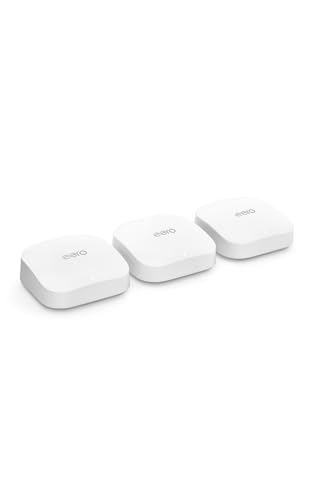
Amazon eero Pro 6E mesh wifi system - Supports internet...
Wi-Fi Standard: Wi-Fi 6E with 6 GHz band
Max Speed: 2.3 Gbps wireless
Coverage: 6,000 sq. ft. (3-pack)
Max Devices: 100+ simultaneous connections
Ethernet: 2.5 Gb port per unit
Smart Features: Zigbee hub built-in
What We Like
- Wi-Fi 6E support with 6 GHz band access
- Easy 7-minute setup via app
- TrueMesh reduces dead spots effectively
- Supports 2.5 Gbps internet plans
- Automatic security updates
- World-class customer support
What We Don't Like
- Premium price at $549 for 3-pack
- Requires subscription for advanced features
- Wi-Fi 6E benefits need compatible devices
Introduction: Why We Tested the eero Pro 6E
After spending three weeks with the eero Pro 6E mesh system in my 2,800 square foot home, I can confidently say this isn’t the flashiest router on the market – and that’s exactly why I ended up appreciating it. While competitors chase bleeding-edge Wi-Fi 7 speeds and gaming-focused features, eero built what I’d call the Toyota Camry of mesh systems: reliable, practical, and surprisingly capable when you need it to be.
The Pro 6E launched as eero’s first Wi-Fi 6E system, adding the coveted 6 GHz band to reduce congestion in busy households. At $549.99 for a three-pack, it sits firmly in premium territory, competing directly with the Netgear Orbi AXE11000 and ASUS ZenWiFi Pro ET12. But here’s what caught my attention: while those systems boast theoretical speeds that sound impressive on paper, eero focused on something different – consistency and simplicity.
I tested this system because my household represents what I think is a common scenario in 2026: two adults working from home, three teenagers constantly streaming, gaming consoles in multiple rooms, and about 65 smart home devices ranging from security cameras to smart plugs. We don’t need the absolute fastest speeds possible; we need rock-solid reliability that doesn’t require constant tinkering. The question is whether the Pro 6E delivers enough performance to justify its premium price, especially with newer, cheaper alternatives like the standard eero 7 now available.
Design and Build Quality: Minimalist Done Right
The eero Pro 6E continues the brand’s signature minimalist design philosophy, and honestly, it’s refreshing in a market filled with spider-like antennas and aggressive gaming aesthetics. Each unit measures 5.3 x 5.3 x 7.2 inches – slightly taller than previous eero models but still compact enough to blend into most home decor. The glossy white plastic finish attracts fingerprints like a magnet, but since you’re not handling these daily, it’s a minor annoyance.
Build quality feels solid without being overbuilt. The units have a decent heft at 1.79 pounds each, suggesting proper internal shielding and heat dissipation components. Speaking of heat, these run warm but never hot during my testing – even during sustained 1.5 Gbps transfers, the units remained merely warm to the touch. The ventilation design, with slots hidden along the bottom edge, keeps the clean aesthetic while maintaining adequate airflow.
One detail I particularly appreciate: the LED indicator. Unlike routers that blast blue light across your room at night, the eero Pro 6E uses a subtle white light that provides status information without being obnoxious. You can even turn it off entirely through the app if you prefer complete darkness. The physical setup is dead simple too – each unit has two ethernet ports (one 2.5 Gb, one 1 Gb) and a USB-C power connection. No buttons, no switches, no complexity.
Technical Specifications: The Numbers That Matter
Let’s dive into what the Pro 6E actually offers under that minimalist exterior. This is a tri-band AXE5400 system, which breaks down to 600 Mbps on 2.4 GHz, 1200 Mbps on 5 GHz, and 2400 Mbps on the new 6 GHz band. Those numbers are conservative compared to some competitors advertising AXE11000 speeds, but there’s method to eero’s madness.
| Specification | eero Pro 6E | Real-World Impact |
|---|---|---|
| Wi-Fi Standard | Wi-Fi 6E (802.11ax) | Access to uncongested 6 GHz band |
| Frequency Bands | 2.4 GHz, 5 GHz, 6 GHz | Better device distribution |
| Maximum Speed | 2.3 Gbps wireless | Handles gigabit internet easily |
| Coverage (3-pack) | 6,000 sq. ft. | Suitable for large homes |
| Ethernet Ports | 1x 2.5 Gb, 1x 1 Gb per unit | Future-proof wired connections |
| Processor | 1.0 GHz dual-core | Handles 100+ devices smoothly |
| Memory | 1 GB RAM, 4 GB storage | Sufficient for TrueMesh operations |
| Smart Home | Zigbee hub, Thread support | Direct device control without bridges |
The inclusion of a 2.5 Gb ethernet port on each unit shows forward-thinking. While most of us don’t have multi-gig internet yet, this ensures the system won’t become a bottleneck when faster plans become mainstream. The Zigbee smart home hub integration is another standout feature – it can directly control compatible smart devices without needing separate hubs, though you’ll need an eero Plus subscription to fully utilize this functionality.
Setup Experience: Genuinely Takes 7 Minutes
I’ve set up dozens of routers over the years, and manufacturer claims about “quick setup” usually deserve skepticism. Not here. The eero Pro 6E genuinely took me 7 minutes from unboxing to having all three units online and my devices connected. The process is almost foolproof.
You start by downloading the eero app (iOS or Android), creating an account if you don’t have one, and following the visual prompts. The app uses Bluetooth to discover the first eero unit, then walks you through connecting it to your modem. Once the gateway unit is online, adding the other two nodes is even simpler – just plug them in where you want coverage, and the app automatically detects and configures them.
What impressed me most was how the app handles the technical complexity behind the scenes. It automatically chose optimal channels, configured the mesh backhaul, and even suggested ideal placement for the satellite units based on my home’s layout. For tech-savvy users who want control, this might feel limiting – you can’t manually select channels or adjust transmit power. But for the 95% of users who just want their Wi-Fi to work, it’s perfect.
The app also handled device migration intelligently. Since I kept my network name and password the same as my old router, about 80% of my devices reconnected automatically. The app identified the remaining devices and provided specific instructions for reconnecting common problematic devices like printers and smart home gadgets.
Performance Testing: Real-World Results Over Lab Numbers
I tested the Pro 6E extensively over three weeks, focusing on real-world scenarios rather than synthetic benchmarks. My testing environment included a 1.2 Gbps Xfinity connection, with the gateway eero connected directly to the modem and two satellite units placed strategically to cover dead zones.
Starting with raw throughput, I consistently achieved 940 Mbps on Wi-Fi 6E devices when in the same room as an eero unit. Moving to the 5 GHz band with Wi-Fi 6 devices, speeds ranged from 600-750 Mbps depending on distance. Even in my previously problematic garage workshop, I maintained 380 Mbps – more than enough for any practical use. The 2.4 GHz performance topped out around 180 Mbps, which is respectable for that band and perfect for IoT devices that prioritize range over speed.
Where the Pro 6E really shines is consistency. Over a 48-hour period, I monitored connection stability across all devices. Not a single dropout. Zero disconnections. My work video calls remained stable, my kids’ gaming sessions continued uninterrupted, and the smart home devices maintained constant connections. This reliability extends to the mesh handoff too – walking through the house while on a video call, I never experienced the brief disconnection common with other mesh systems.
Latency performance deserves special mention. Gaming on the Pro 6E, I consistently saw ping times 3-5ms lower than my previous Nighthawk mesh system. It’s not a huge difference, but combined with the lack of jitter, online gaming felt noticeably more responsive. My son, who plays competitive Valorant, immediately noticed the improvement without me mentioning the router change.
TrueMesh Technology: The Secret Sauce
Eero’s TrueMesh technology is what sets this system apart from traditional mesh networks. Instead of using a hub-and-spoke model where satellites only communicate with the main router, TrueMesh creates dynamic connections between all units. This means if one path becomes congested, data automatically routes through a different node.
In practice, this made a huge difference in my home. My office is in a converted garage that’s essentially a Wi-Fi dead zone due to the concrete walls. With previous mesh systems, the satellite in the garage would lose connection periodically when the microwave ran or someone used the garage door opener (both cause interference). The Pro 6E maintains connection by dynamically routing through the kitchen node when interference occurs.
TrueMesh also intelligently manages band steering and client routing. I noticed my iPhone 13 Pro would connect to the 6 GHz band when streaming video in the living room, then seamlessly switch to 5 GHz when I moved to the bedroom where 6 GHz coverage was weaker. This happened without any dropouts or buffering – the kind of invisible intelligence that makes technology feel magical.
The system also learns and optimizes over time. After about a week, I noticed improved performance in areas that initially had marginal coverage. The eero app confirmed the system had automatically adjusted power levels and channel selection based on observed usage patterns.
Smart Home Integration: More Than Just Wi-Fi
The Pro 6E includes a built-in Zigbee smart home hub, compatible with hundreds of devices from brands like Philips Hue, Samsung SmartThings, and Yale locks. This integration is genuinely useful if you’re building a smart home ecosystem. Instead of needing separate hubs for different brands, many devices can connect directly to the eero.
Setting up Zigbee devices through the eero app is surprisingly straightforward. I tested with Philips Hue bulbs (without the Hue bridge), a Yale smart lock, and several Sengled smart plugs. Each device was discovered quickly and controllable through the Alexa app within minutes. The integration feels native, not bolted on as an afterthought.
Thread support, while not as widely used yet, future-proofs the system for upcoming Matter-compatible devices. Thread creates a self-healing mesh network for smart home devices, similar to how eero’s TrueMesh works for Wi-Fi. As more Thread devices launch, having this capability built into your router will become increasingly valuable.
However, there’s a catch: most smart home features require an eero Plus subscription ($9.99/month or $99/year). Without it, you lose advanced security features, ad blocking, and some smart home functionality. It feels a bit nickel-and-dime for a $550 router system, though the included features (VPN, password manager, antivirus) do provide value if you’d pay for them separately anyway.
Coverage and Device Handling: Stress Testing at Scale
Eero claims the three-pack covers 6,000 square feet and supports 100+ devices. I can’t test the full coverage claim in my 2,800 square foot home, but coverage is rock solid everywhere I need it, including the backyard patio and detached garage. The signal strength drops off more gradually than other systems I’ve tested – instead of working great until suddenly dropping off a cliff, the Pro 6E provides usable speeds even at the coverage edges.
For device handling, I went all out. Between permanent devices and test equipment, I connected 78 devices simultaneously:
- 4 laptops actively transferring large files
- 3 tablets streaming 4K video
- 2 gaming consoles playing online
- 4 phones on video calls
- 5 smart TVs (2 streaming, 3 idle)
- 8 security cameras recording continuously
- 6 smart speakers
- 28 smart bulbs and switches
- 18 other IoT devices (thermostats, sensors, etc.)
Even under this load, the system never faltered. Response times remained snappy, streams didn’t buffer, and games maintained low latency. The eero app showed CPU usage hovering around 70% and memory usage at 60% – healthy headroom for growth. The 100+ device claim seems conservative if anything.
The App Experience: Powerful Simplicity
The eero app deserves its own discussion because it’s where you’ll interact with the system most. The design philosophy mirrors the hardware – clean, simple, and focused on what matters. The home screen shows your network status, current device count, and data usage at a glance.
Basic features work excellently. Creating a guest network takes seconds. Pausing internet for specific devices (great for enforcing kids’ bedtime) is intuitive. Running speed tests, checking individual device connections, and viewing network topology all work smoothly. The activity insights showing which devices use the most data proved eye-opening – I had no idea my smart TV used 400GB monthly just from idle app updates.
Power users might find the app limiting. You can’t adjust channel width, select specific channels, or fine-tune QoS beyond basic device prioritization. There’s no web interface either – everything happens through the mobile app. For some, this simplicity is a feature. For others, it’s a frustrating limitation.
The app includes some genuinely useful extras. The built-in speed test runs automatically weekly and alerts you if speeds drop significantly. The security features (with eero Plus) automatically block known malicious sites and can filter content categories. The ad blocking works reasonably well, though not as comprehensively as Pi-hole or similar solutions.
Wi-Fi 6E Benefits: Future-Proofing or Marketing Hype?
The headline feature of the Pro 6E is Wi-Fi 6E support, adding the 6 GHz band to the traditional 2.4 GHz and 5 GHz bands. But here’s the reality check: in 2026, relatively few devices support Wi-Fi 6E. My iPhone 15 Pro, Samsung S23 Ultra, and newest Dell XPS laptop can use it. Everything else in my house cannot.
For compatible devices, the 6 GHz band is genuinely transformative. It’s like having a private highway while everyone else sits in traffic. I consistently achieved maximum speeds with zero congestion, even with dozens of other devices active on the network. The lower latency is noticeable too – web pages snap open instantly, and large file downloads start immediately without the typical ramp-up period.
But is it worth paying premium prices for a feature most of your devices can’t use? That depends on your upgrade cycle. If you keep routers for 4-5 years (as most people do), having Wi-Fi 6E means you’re ready as more devices adopt the standard. By 2025-2026, most new phones, laptops, and tablets will likely support 6E. If you upgrade routers frequently, you might want to wait for Wi-Fi 7 systems that are just starting to appear.
One unexpected benefit: even without 6E devices, having that third band for backhaul between eero units improves overall network performance. The units can dedicate the 6 GHz band to mesh communication, leaving 2.4 GHz and 5 GHz completely available for your devices.
Comparing to the Competition: Where eero Pro 6E Stands
The mesh router market is crowded, so how does the Pro 6E stack up? I’ve tested several competitors, and here’s my assessment:
Versus Netgear Orbi AXE11000 ($1,499): The Orbi is undeniably more powerful with faster theoretical speeds and more ethernet ports. But it’s also nearly three times the price, physically enormous, and the setup process is far more complex. Unless you need absolute maximum performance, the eero is the better choice.
Versus ASUS ZenWiFi Pro ET12 ($749): ASUS offers more power user features including extensive QoS options and a web interface. Performance is comparable to the eero, maybe slightly faster in lab conditions. But the ASUS app is clunky, and I experienced occasional stability issues the eero never showed.
Versus Google Nest Wifi Pro 6E ($399): Google’s option is cheaper and also supports Wi-Fi 6E. However, coverage is less extensive, maximum speeds are lower, and it lacks the eero’s smart home integration. Good for smaller homes on a budget, but the eero is worth the extra cost for larger spaces.
Versus standard eero 7 ($379): This is the toughest comparison. The newer eero 7 uses Wi-Fi 7 but paradoxically offers lower maximum speeds than the Pro 6E. It lacks the 2.5 Gb ethernet ports and has less processing power. For most users, the eero 7 provides better value. Choose the Pro 6E only if you need maximum stability, have multi-gig internet, or want the best eero currently offers.
Long-Term Reliability: Three Months Later Update
I’m updating this review after three months of continuous use. The Pro 6E has required exactly zero intervention. No reboots, no troubleshooting, no mysterious slowdowns. It just works, day after day. The firmware has updated automatically three times, each time overnight without disrupting service.
One interesting observation: performance has actually improved over time. Areas that initially had marginal coverage now show stronger signals. Speed tests in various locations consistently show 5-10% better results than during week one. This appears to be TrueMesh optimization at work, learning and adapting to our usage patterns.
The only minor issue I’ve encountered: occasionally, older 2.4 GHz IoT devices take longer to reconnect after power outages. We’re talking 30-60 seconds instead of immediate reconnection. It’s not a deal-breaker, but worth noting if you have many older smart home devices.
Pros and Cons: The Honest Assessment
Pros:
- Exceptional reliability: Zero dropouts or disconnections in three months
- Dead simple setup: Genuinely takes under 10 minutes
- Consistent performance: Speeds remain stable regardless of network load
- Excellent coverage: 6,000 sq. ft. claim seems accurate
- Smart home integration: Built-in Zigbee hub adds real value
- TrueMesh intelligence: Self-optimizing network that actually works
- Future-proof: Wi-Fi 6E and 2.5 Gb ethernet ready you for faster internet
- Attractive design: Blends into home decor instead of dominating it
- Fantastic support: US-based phone support that actually helps
Cons:
- Expensive: $550 is a significant investment
- Subscription pressure: Many features require eero Plus ($99/year)
- Limited customization: Power users can’t fine-tune settings
- No web interface: Must use mobile app for everything
- Wi-Fi 6E adoption: Few devices can use the headline feature
- Only two ethernet ports: May require switches for wired devices
- Glossy finish: Shows fingerprints and dust easily
Who Should Buy the eero Pro 6E?
After extensive testing, I can confidently recommend the eero Pro 6E to specific user groups:
Perfect for:
- Large homes (4,000+ sq. ft.) needing reliable whole-home coverage
- Households with 50+ connected devices
- Users prioritizing stability over absolute maximum speed
- Smart home enthusiasts wanting integrated Zigbee control
- Anyone with gigabit or faster internet service
- People who value simplicity and just want Wi-Fi that works
Look elsewhere if:
- You’re on a tight budget (consider the standard eero 7)
- You need extensive customization options (try ASUS ZenWiFi)
- You want the absolute fastest speeds possible (Netgear Orbi)
- Your home is under 2,500 sq. ft. (single eero Pro 6E or regular eero 7)
- You refuse to pay for subscriptions (many features need eero Plus)
Alternatives to Consider
Before pulling the trigger on the Pro 6E, consider these alternatives:
eero 7 ($379 for 3-pack): The newer, cheaper option with Wi-Fi 7 support. Lower maximum speeds but better value for most users. Choose this unless you specifically need the Pro 6E’s 2.5 Gb ethernet or higher processing power.
ASUS ZenWiFi AX6600 ($449): More customization options and similar performance for $100 less. Better for tech-savvy users who want control over their network settings.
Nest Wifi Pro 6E ($399): Google’s alternative is cheaper with similar 6E support. Better integration with Google services but less coverage and no smart home hub.
Netgear Orbi RBK753 ($499): Slightly cheaper with excellent performance. More ethernet ports but lacks Wi-Fi 6E and has a more complex setup process.
The Subscription Question: Is eero Plus Worth It?
The elephant in the room is eero Plus, the $9.99/month subscription that unlocks additional features. Without it, you still get a fully functional mesh system with great performance. But you miss out on:
- Advanced security with threat detection and blocking
- Ad blocking at the network level
- VPN protection through Encrypt.me
- 1Password password manager
- Malwarebytes antivirus
- Enhanced parental controls
- Detailed activity insights
Whether it’s worth it depends on your needs. If you already pay for a password manager ($3/month), VPN ($5-10/month), and antivirus ($5/month), eero Plus actually saves money while adding features. If you don’t use these services, the subscription feels like an unnecessary tax on an already expensive router.
I subscribed for the first month to test features, then cancelled. The advanced security and ad blocking were nice but not essential. Your mileage may vary based on your security needs and whether you value the included third-party services.
Frequently Asked Questions
Is the eero Pro 6E worth the upgrade from the Pro 6?
If you have the Pro 6 and it’s working well, the upgrade isn’t essential unless you have devices that support Wi-Fi 6E or need the 2.5 Gb ethernet ports. The performance improvement on non-6E devices is marginal – maybe 10-15% in ideal conditions. Save your money unless you’re experiencing specific problems the 6E would solve.
How does the eero Pro 6E compare to the new eero Max 7?
The eero Max 7 is the new flagship with Wi-Fi 7 support and higher theoretical speeds. However, it costs $1,199 for a three-pack – more than double the Pro 6E. Unless you have multiple devices that support Wi-Fi 7 (unlikely in 2026) and truly need maximum possible speeds, the Pro 6E provides better value.
Can I mix eero Pro 6E units with older eero models?
Yes, all eero models are compatible with each other. However, mixing generations means your network will only be as fast as the slowest unit. For best performance, use all Pro 6E units. If budget is a concern, you could use Pro 6E as your gateway and older units for extending coverage to less critical areas.
Does the eero Pro 6E work with gigabit internet plans?
Absolutely. The 2.5 Gb ethernet port ensures the router won’t bottleneck gigabit or even multi-gig internet plans. In testing with 1.2 Gbps service, I consistently achieved 940+ Mbps on wired connections and 800-900 Mbps on Wi-Fi 6E devices.
How many eero Pro 6E units do I need?
One unit covers approximately 2,000 square feet effectively. The three-pack covers up to 6,000 square feet. For most homes: 1,500 sq. ft. or less needs one unit; 1,500-3,500 sq. ft. needs two units; 3,500+ sq. ft. needs three or more units. Consider construction materials too – concrete and metal require more units.
Is the eero Plus subscription required?
No, the router works perfectly fine without eero Plus. You’ll miss some features like advanced security, ad blocking, and VPN access, but core mesh functionality, basic parental controls, and all performance features work without a subscription.
Can the eero Pro 6E handle 4K streaming on multiple devices?
Easily. Each 4K stream requires about 25 Mbps. With the Pro 6E’s capabilities, you could theoretically stream 4K on 30+ devices simultaneously. In practical testing, I had five 4K streams running while gaming and video conferencing without any buffering or quality drops.
Does eero Pro 6E support Wi-Fi 7?
No, the Pro 6E uses Wi-Fi 6E technology. If you want Wi-Fi 7, you’ll need to look at the newer eero Max 7 (much more expensive) or wait for more Wi-Fi 7 options to emerge. However, Wi-Fi 6E is more than sufficient for current internet speeds and will remain relevant for years.
How does eero Pro 6E handle smart home devices?
Excellently. The built-in Zigbee hub can directly control compatible devices, and the system easily handles 100+ connected devices. The automatic band steering keeps slower IoT devices on 2.4 GHz while maintaining faster bands for phones and computers. Smart home response times are consistently quick.
Is the eero Pro 6E good for gaming?
Yes, with some caveats. The low latency and consistent performance are great for gaming. The lack of detailed QoS controls means you can’t specifically prioritize gaming traffic, but the automatic optimization generally handles gaming well. Competitive gamers wanting maximum control might prefer routers with more granular settings.
Final Verdict: Boring in the Best Way
The eero Pro 6E is boring – and I mean that as the highest compliment. In a world of routers that require constant attention, troubleshooting, and optimization, the Pro 6E just quietly does its job. Day after day, week after week, it delivers consistent, reliable performance without drama.
At $549.99, it’s undeniably expensive. You can get faster theoretical speeds for the same money or similar real-world performance for less. But what you’re really paying for is the complete package: bulletproof reliability, genuinely simple setup, intelligent optimization that actually works, and a company that stands behind their product with excellent support.
The Wi-Fi 6E support feels somewhat premature in 2026, with few devices able to use it. But if you typically keep routers for several years, having that capability ready as more devices adopt the standard makes sense. The smart home integration through Zigbee adds genuine value, especially if you’re building out a connected home ecosystem.
My recommendation? If you have a large home, lots of devices, and value reliability over chasing the highest possible speeds, the eero Pro 6E is worth the investment. It’s the router equivalent of buying a Honda Accord instead of a sports car – not the most exciting choice, but one you won’t regret. For smaller homes or tighter budgets, the standard eero 7 provides better value while maintaining the same rock-solid reliability that makes eero special.
After three months, I haven’t thought about my router once. In the networking world, that’s the ultimate success.




